

 English

Amazon FBA labeling requirements come down to one rule: every unit that arrives at a fulfilment centre must be scannable, and it must be scannable as your unit. That normally means an FNSKU label on each item, covering the original manufacturer barcode. On top of that baseline, some products need extra warning labels — a suffocation warning on poly bags, an expiration date on anything that perishes, a "sold as set" marking on multipacks.
Getting these wrong is expensive in a specific way: the shipment is not rejected at the border, it is checked in late, and you pay for the repackaging or the disposal. This guide sets out the Amazon FBA label requirements and the FBA label requirements that matter in practice — what goes on the label, where it goes, what size and material to print, and the mistakes that most often trigger an unplanned prep fee.
What Labels Does Amazon FBA Require on Every Unit?
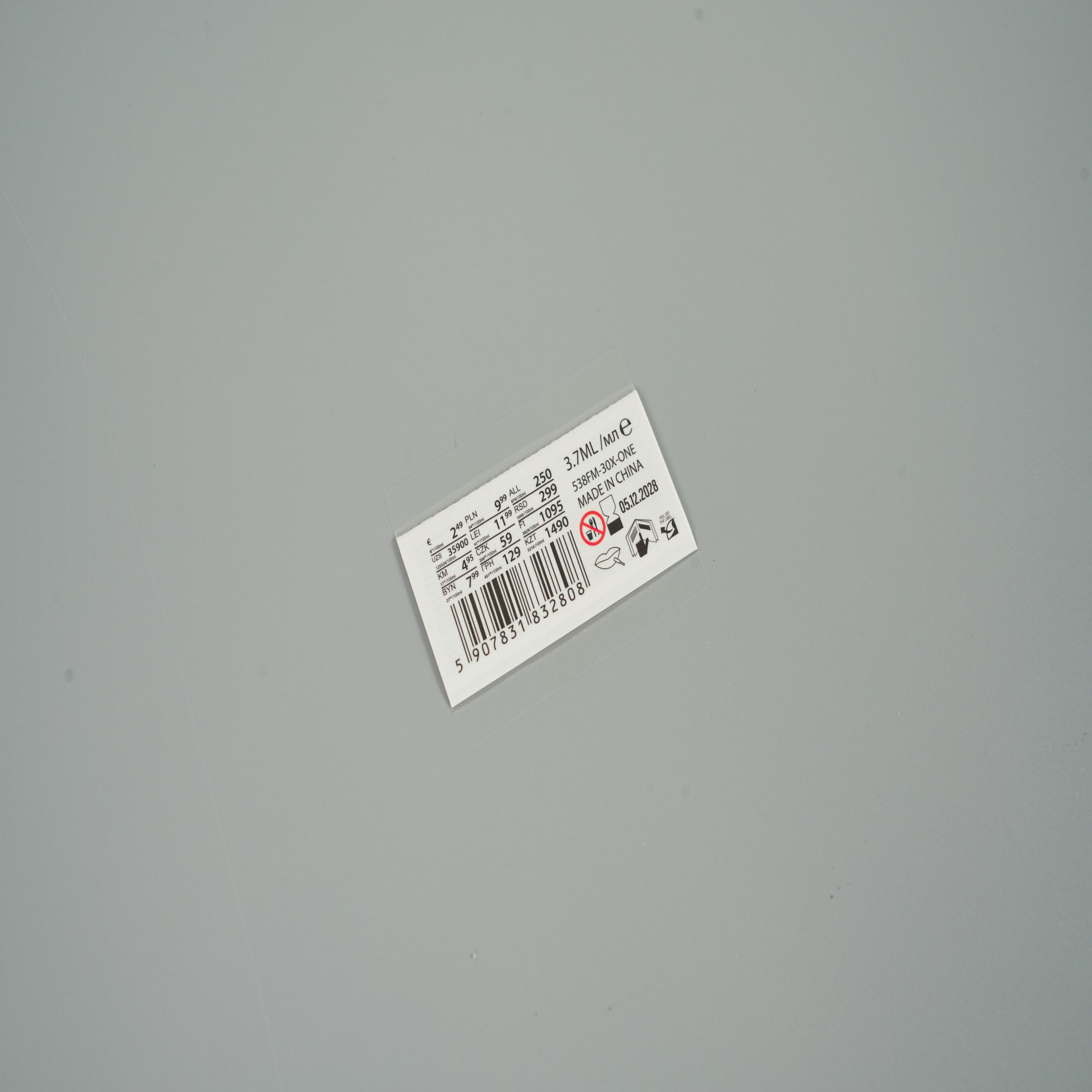
There are two labelling routes into FBA, and which one applies to you depends on whether your product already carries a barcode Amazon can use.
| Route | When it applies | Label on each unit |
|---|---|---|
| Manufacturer barcode | Product has a valid UPC/EAN and you do not need to separate your inventory from other sellers' | None added — the existing barcode is used |
| Amazon barcode (FNSKU) | Barcode is missing, unreadable, or you need your inventory tracked separately | One FNSKU label per unit, covering the original barcode |
In practice most private-label sellers use the FNSKU route, because it guarantees that a return or a stranded unit is traced back to them and not to a commingled pool. It also means the label is yours to print and control, rather than something you hope the factory got right — which is why most Amazon FBA labels are produced by the seller rather than the manufacturer.
Because FNSKU labels are applied one per unit, they are almost always printed as rolls for a thermal printer or supplied pre-printed on a roll. That is exactly the format we cover in our guide to roll labels vs sheet labels.
What Is an FNSKU and How Is It Different From a Barcode?
An FNSKU (Fulfilment Network Stock Keeping Unit) is Amazon's internal identifier for one seller's specific unit. A UPC or EAN identifies the product and is shared by every seller who sells it; an FNSKU identifies your stock of that product and is unique to your account.
- The FNSKU is generated by Amazon when you convert a listing to "Fulfilled by Amazon".
- Amazon barcode labels are rendered as a Code 128 barcode with human-readable text underneath, so the number can be typed in if the scan fails.
- It must be scannable on arrival — a blurry, glossy or curved barcode is the single most common cause of a check-in delay.
- It is not the same as the ASIN. The ASIN identifies the listing; the FNSKU identifies your physical units.
The practical consequence for printing is that FNSKU labels are a variable-data job. Every unit gets the same number, but you will reprint the roll many times over the life of the product, so the barcode needs to print cleanly at small size on whatever printer you use — thermal transfer labels with a resin or wax-resin ribbon hold up best.
Where Should the FNSKU Label Be Placed?
Placement rules exist so the barcode can be scanned without opening anything. The working principles are simple, even though Amazon's help pages spell them out at length.
- Put the label on the outside of the retail packaging, on a flat, smooth surface — never on a curved, textured or shrink-wrapped edge where it can wrinkle.
- Cover the original UPC/EAN barcode completely. Two visible barcodes on one unit confuse the scanner and can cause the unit to be flagged.
- Do not place the label over an opening, a seam, or any text the customer needs to read.
- For bagged items, place the label on the outside of the bag, not on the product inside it.
- Do not cover the suffocation warning if one is required on the same bag.
A common failure is a label that is technically present but placed across the fold of a box lid, so it splits when the carton flexes in transit. Flat, single-plane placement avoids it. FBA shipping labels on the outer carton follow a separate path — they are generated in Seller Central, printed by you and applied to the box, and they sit alongside the unit labels rather than replacing them.
What Size and Material Should an FBA Label Be?
Amazon's requirement is that the barcode is scannable and unobstructed; it does not hand you a single mandated label size. The size that has become the de facto standard is the one that fits a standard thermal label printer.
| Spec | Common practice |
|---|---|
| Label size | 1 × 2⅝ inches (roughly 25 × 67 mm) — the standard FNSKU label |
| Barcode symbology | Code 128, generated by Amazon — do not redraw or resize it |
| Quiet zone | Keep clear white space on both sides of the bars; do not print to the edge |
| Face stock | Direct thermal for short-lived labels, thermal transfer for longer storage |
| Adhesive | Permanent acrylic — removable adhesive invites the label to fall off in transit |
Two material choices matter more than they look. Direct thermal labels are cheap and need no ribbon, but they darken and fade with heat and light, which is a problem if stock sits in a warm warehouse for months. Thermal transfer with a resin ribbon costs more per label and stays legible far longer — the right call for anything with a long storage life or a compliance requirement attached to it. If you need custom printed barcode labels rather than plain thermal output, choose a matte film face stock; glossy stock reflects scanner light and scans less reliably. Confirm the current minimum barcode size in Seller Central before you commit a print run.
If your product needs a brand-facing label as well as a scannable one, the two can be combined on a single custom sticker label so the unit arrives looking intentional rather than prepped.
Which Products Need Extra Warning Labels?
The FNSKU gets the unit scanned. These additional labels are what keep the unit compliant once it is inside the network.
| Situation | Label required |
|---|---|
| Product packed in a poly bag with an opening of 5 inches (13 cm) or more | Suffocation warning printed on or attached to the bag |
| Product has a shelf life or expiry date | Expiry printed on the unit, and on the outer case in larger type |
| Item is sharp or has exposed blades | Bagged with a sharp-object warning |
| Two or more items sold together as one unit | "Sold as set — do not separate" marking on the outside |
| Imported goods entering the US | Country of origin marking, e.g. "Made in China" |
The poly bag suffocation warning label is the one that catches sellers most often, because it is triggered by the bag, not by the product. The standard wording is a fixed sentence beginning "WARNING: To avoid danger of suffocation, keep this plastic bag away from babies and children…" and it must stay legible — the larger the bag, the larger the type has to be. The safest approach is to print the warning directly onto the bag rather than rely on a separate sticker that can peel off. The Amazon expiration date label requirements work the same way: the date has to appear on the unit and on the outer case, so plan both at the artwork stage rather than adding the case marking later.
For products where the warning text, the ingredient panel and the brand block all have to share a small surface, a folded or multi-layer construction gives each element its own readable face instead of shrinking everything. That is what our multi layer labels are built for.
How Do FBA Labels Work for Bundles, Kits and Multipacks?
Amazon treats a bundle as one sellable unit, which means the packaging has to behave like one unit too. The outer bag or box needs its own FNSKU, and it needs to make clear that the contents are not to be split.
- Apply the FNSKU to the outer bundle packaging, not to the individual items inside.
- Add the "sold as set" marking so the prep team does not treat the inner items as separate stock.
- If the bundle is bagged, the suffocation warning applies to the outer bag.
- Keep the inner items' original barcodes covered, so only one scannable code is visible on the outside.
Kits assembled by the seller are a frequent source of unplanned prep because the inner units still show their own barcodes. Covering them at the source, on the inner packaging, is cheaper than paying for it at the fulfilment centre.
Common FBA Labelling Mistakes That Cause Rejections
| Mistake | What it costs you |
|---|---|
| FNSKU printed on a home inkjet printer | Barcode smudges or will not scan; units are re-labelled at your expense |
| Original barcode left visible under the FNSKU | Two codes compete at the scanner; unit is flagged for manual handling |
| Label wrapped over a curved or flexible surface | Barcode distorts or splits in transit |
| No suffocation warning on a qualifying poly bag | Unit is bagged and re-labelled before it can be sold |
| Expiry only on the inner unit | Outer case has to be re-marked before it is received |
| Direct thermal labels used for slow-moving stock | Barcode fades before the stock ships; label has to be reprinted |
Frequently Asked Questions
Can I print my own FNSKU labels?
Yes — Amazon lets you download the FNSKU label sheet and print it yourself. The constraint is print quality, not permission: the barcode has to scan reliably, which in practice means a dedicated thermal label printer rather than a desktop inkjet.
Does every unit need its own FNSKU label?
Every unit that is scanned as a separate sellable item does. A bundle is one unit and gets one label on the outside; the individual items inside are not separately labelled.
Do I need a suffocation warning on every poly bag?
Only where the bag opening is 5 inches (13 cm) or more. Below that threshold the warning is not required, though printing it anyway costs almost nothing and removes any doubt.
What is the difference between an ASIN and an FNSKU?
The ASIN identifies the product listing on Amazon; the FNSKU identifies your specific inventory of that listing. The label you print and apply to the physical unit carries the FNSKU.
Conclusion
FBA labelling rewards preparation. One scannable FNSKU per unit, placed flat and covering the old barcode, plus the warning and expiry labels that apply to your product, is the whole checklist — and getting it right at the factory is far cheaper than fixing it at the fulfilment centre. Choose thermal transfer labels for anything that will sit in storage, and confirm the current barcode spec in Seller Central before you print.
As a custom FBA labels manufacturer and FBA Product Labels supplier we produce FNSKU labels, barcode labels, poly bag warnings and multi-layer constructions on roll or sheet, printed to your artwork. Send us your label dimensions and product type and we will come back with a material recommendation and a quote.
